Introduction:
When building enterprise-grade serverless applications with Microsoft Azure Functions, it is common to secure APIs with Microsoft Azure Application Gateway rather than exposing the Function App endpoint directly to the internet.
Using Application Gateway provides several advantages:
- Centralized API exposure
- Web Application Firewall (WAF) protection
- SSL termination
- Path-based routing
- URL rewrite capabilities
- Better traffic management
- Integration with private networking
One common scenario is exposing Azure Functions behind a custom path such as:
https://mydomain.com/[your path]/Ping
Instead of directly using the Azure Function URL:
https://myfunction.azurewebsites.net/api/Ping
In this article, we will learn how to:
- Configure Azure Functions for custom routing
- Understand the default /api route behavior
- Modify host.json
- Configure Application Gateway path-based routing
- Configure URL rewrite rules
- Test the final setup
If you are new to path-based routing with Azure Application Gateway, please go through my previous article on Azure Application Gateway path-based routing with App Services
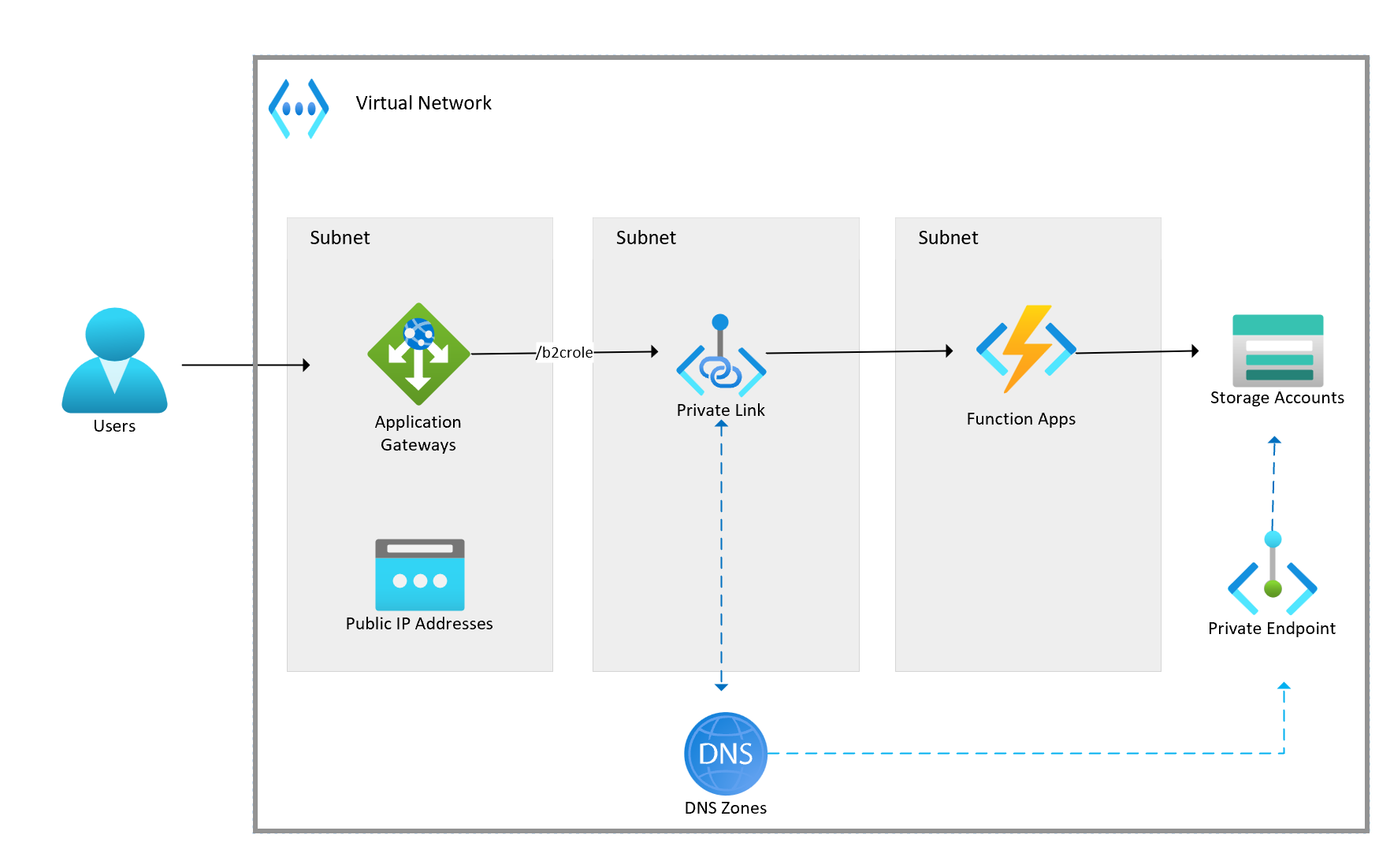
Understanding the Default Azure Function Route
By default, HTTP-triggered Azure Functions automatically use the /api route prefix.
For example:
[Function("Ping")]
public async Task<HttpResponseData> Run(
    [HttpTrigger(AuthorizationLevel.Function, "get")]
    HttpRequestData req)
is exposed as:
https://<functionapp>.azurewebsites.net/api/Ping
The /api prefix is automatically added by the Azure Functions runtime.
This behavior is controlled through the host.json configuration file.
Default host.json Configuration
A typical host.json file looks like this:
{
  "version": "2.0",
  "logging": {
    "applicationInsights": {
      "samplingSettings": {
        "isEnabled": true,
        "excludedTypes": "Request"
      },
      "enableLiveMetricsFilters": true
    }
  }
}
Since there is no HTTP route configuration present, Azure Functions automatically applies the default /api route prefix.
Customizing or Removing the /api Prefix
You can customize or completely remove the /api prefix by adding the extensions.http.routePrefix configuration inside host.json.
Remove the /api Prefix
{
  "version": "2.0",
  "logging": {
    "applicationInsights": {
      "samplingSettings": {
        "isEnabled": true,
        "excludedTypes": "Request"
      },
      "enableLiveMetricsFilters": true
    }
  },
  "extensions": {
    "http": {
      "routePrefix": ""
    }
  }
}
After deployment, the function endpoint changes from:
https://.azurewebsites.net/api/Ping
to:
https://.azurewebsites.net/Ping
Using a Custom Route Prefix
You can also replace /api with a custom path.
{
  "version": "2.0",
  "extensions": {
    "http": {
      "routePrefix": "b2crole"
    }
  }
}
Now the endpoint becomes:
https://<functionapp>.azurewebsites.net/b2crole/Ping
This is useful when organizing APIs under specific namespaces.
Important Clarification About Path Mappings
Many developers confuse Azure Function App Path Mappings with HTTP routing.
Inside the Function App configuration, there is a feature called:
Path mappings
This feature is only used for:
- Mounting Azure Files
- Mounting Blob Storage
- Accessing storage as local filesystem paths
This does NOT affect:
- HTTP URLs
- API endpoints
- Routing
- Application Gateway behavior
HTTP routing is controlled only through:
- host.json
- Function Route attributes
- Application Gateway rewrite/path rules
Configuring Azure Application Gateway
Now let’s expose the Function App through Microsoft Azure Application Gateway.
Scenario
Azure Function Endpoint
https://b2crole.azurewebsites.net/Ping
Desired Public URL
https://mydomain.com/b2crole/Ping
Configure Backend Pool
In Application Gateway:
Backend Pool
Add the Azure Function hostname:
b2crole.azurewebsites.net
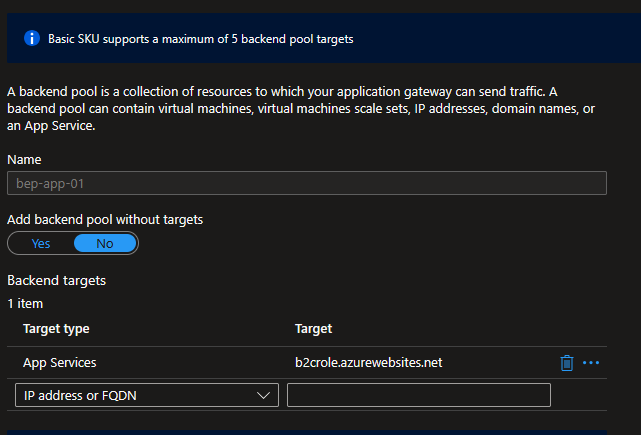
Configure HTTP Settings
In HTTP Settings:
- Backend protocol → HTTPS
- Pick hostname from backend target → Enabled
This ensures Application Gateway correctly forwards requests to the Function App.
Configure Path-Based Routing
Create a Path-Based Rule.
Listener
Example:
Path Rule
/b2crole/*
Forward traffic to the Azure Function backend pool.
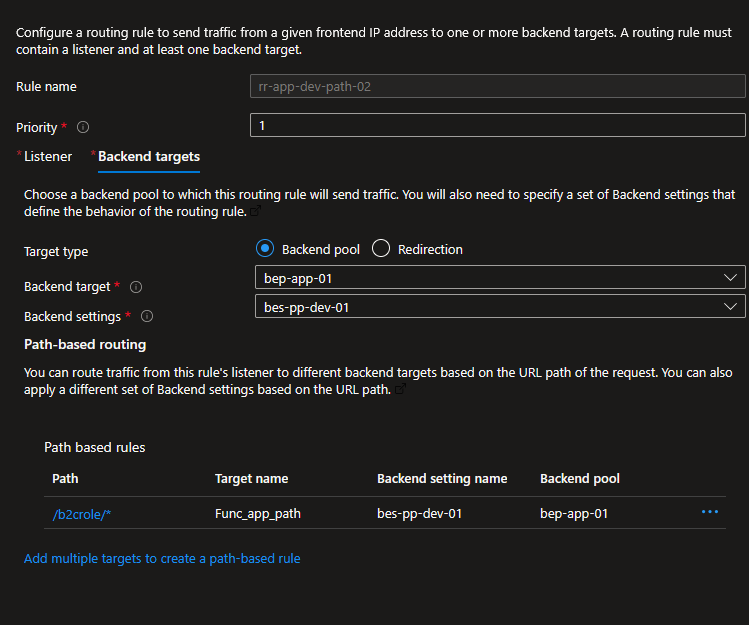
Testing the Configuration
Once deployed, test the endpoint:
https://mydomain.com/b2crole/Ping?code=<function-key>Expected response:
200 OK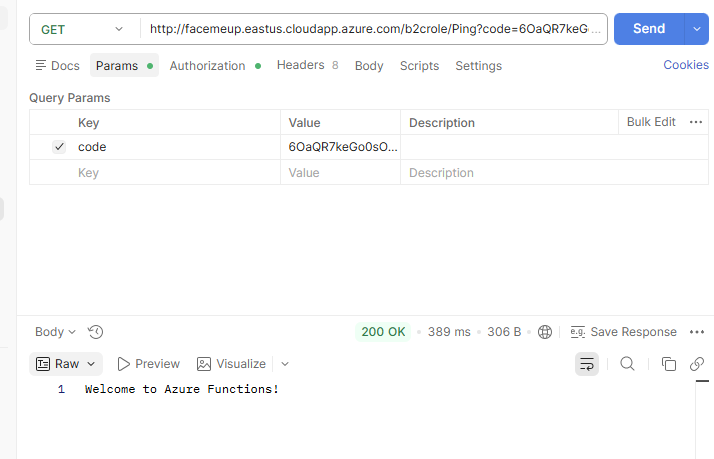
Summary
In this article, we explored how to expose Azure Functions through Microsoft Azure Application Gateway using path-based routing.
We covered:
The default /api route behavior in Azure Functions
How host.json controls the route prefix
How to remove or customize the route prefix
The difference between Path Mappings and HTTP routing
Configuring Application Gateway backend pools
Configuring path-based routing
Using rewrite rules to correctly forward requests
Using Application Gateway in front of Azure Functions is a powerful approach for building secure, scalable, and enterprise-ready serverless APIs.


Leave a Reply