Introduction:
Single Sign-On (SSO) is usually the easy part—Single Logout (SLO) across a hybrid identity stack is where subtle architectural bugs hide. When a single logout action must cleanly tear down sessions across Oracle E-Business Suite (EBS), a WebLogic-hosted EBS Asserter, multiple OCI IAM identity domains, and Azure AD B2C, even minor routing or schema mismatches leave active session cookies behind. This technical deep dive examines four root causes behind broken hybrid logouts and walks through two complete fixes: a chained post-logout redirect workaround for constrained single-node setups, and a standard dual-managed-server Enterprise OIDC architecture.
Series Note: This post is a continuation of my Oracle OCI IAM and Azure AD B2C integration series. If you haven’t read the earlier parts yet, start here:
- Part 1: Configure Azure AD B2C as a Social IdP for Oracle OCI
- Part 2: Secure and Efficient JIT User Provisioning in Oracle OCI with Azure AD B2C as a Social IdP
Building on the federation and Just-in-Time (JIT) provisioning setup from those articles, this post tackles the final piece of the lifecycle: achieving a clean Single Logout (SLO) across Oracle EBS, OCI IAM, and Azure AD B2C.
Architectural Components
- Oracle E-Business Suite (EBS): Houses core business logic and manages session state via database ICX cookies.
- Oracle EBS Asserter: A WebLogic-based middleware application that translates SAML/OIDC identity tokens from OCI IAM into Oracle EBS session cookies.
- OCI IAM (Identity Cloud Service / IDCS): Functions as the identity broker. It is split into two distinct Identity Domains:
- Internal Domain: idcs-internal-domain.identity.oraclecloud.com, federated directly to corporate Microsoft Entra ID.
- External Domain: idcs-external-domain.identity.oraclecloud.com, federated to Azure AD B2C.
- Azure AD B2C: Hosts Custom Policies (OIDC) serving external users, self-service portals, and retirees via yourtenant.b2clogin.com.
Real-World Architectural Constraints
In many enterprise deployments, identity engineers must operate under strict operational constraints:
- Single Asserter Node: Maintaining a single WebLogic Managed Server (/EBSESS) for the EBS Asserter to minimize operational overhead.
- Shared B2C Policy XML: The Azure AD B2C OIDC Custom Policy XML files are shared across multiple enterprise applications. Altering the underlying XML policy definitions specifically for Oracle EBS is strictly prohibited by security and platform governance teams.
Root Causes Behind Broken Hybrid Logouts
When an external user clicks Logout in Oracle EBS, the expected behavior is to invalidate the session across EBS, EBS Asserter, OCI IAM External Domain, and Azure AD B2C, resulting in a clean redirect to https://www.example.com.
Instead, logouts frequently stall, yield HTTP 200 OK blank screens, or drop users into an infinite redirect loop. Four distinct root causes explain this behavior:
- Application Authenticate Agent was not configured
- Configure the Asserter endpoint for the Application Authenticate Agent profile option in EBS
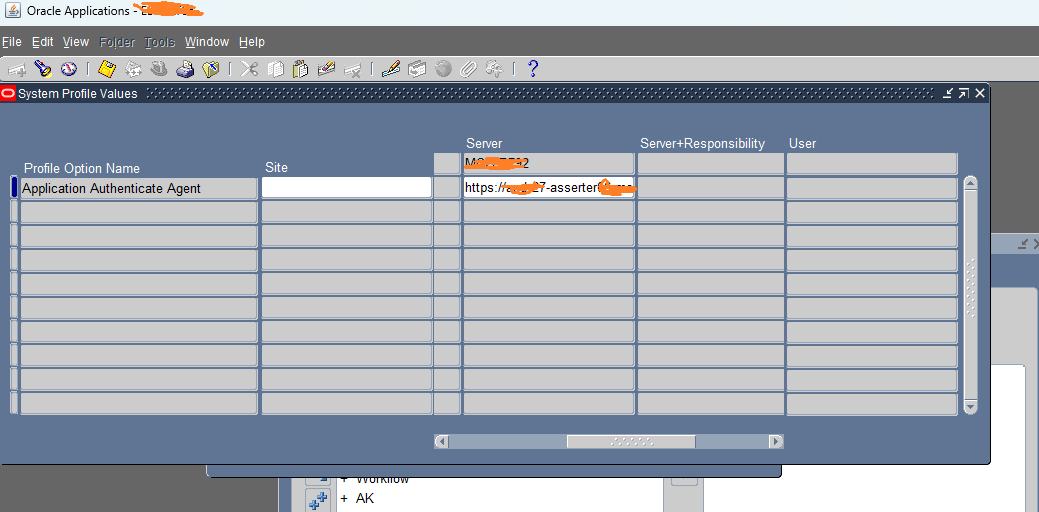
- Configure the Asserter endpoint for the Application Authenticate Agent profile option in EBS
- Misconfiguring Logout URL vs. Post-Logout Redirect URL in OCI IAM
- Inside the OCI IAM Application Configuration console, two distinct URL fields control sign-out flows: Logout URL and Post-logout redirect URL.
- Logout URL: This is an inbound back-channel or front-channel SLO callback endpoint. When OCI IAM initiates a logout, it sends an HTTP request to this URL with a query parameter such as ?session_token=…. When configured to point to the Asserter’s /ssologout.do, OCI IAM triggers an HTTP GET to the Asserter. Because this request originates out of band or via an unauthenticated browser drop in which the ASSERTERSESSIONID cookie is absent, the Asserter returns a blank HTTP 200 OK response. The browser halts on a dead-end page.
- Post-logout redirects URL: This is an outbound destination whitelist. If the downstream target URL (e.g., Azure AD B2C’s end-session endpoint) is missing from this field, OCI IAM security policies block the outbound browser redirect after the local session is destroyed.
- OCI IAM Social IdP Schema Limitations
- When Azure AD B2C is integrated into OCI IAM using OCI’s built-in Social Identity Provider wizard, OCI IAM instantiates an identity provider schema designed primarily for consumer OAuth2/OIDC login flows (such as Google or Facebook login).
- This schema lacks native OIDC Single Logout (SLO) bindings. When OCI IAM receives a logout request for a user authenticated via a Social IdP:
- OCI IAM invalidates its local domain session cookies (SDID, JSESSIONID).
- OCI IAM terminates the logout chain immediately because the Social IdP configuration definition does not possess an outbound SLO endpoint binding.
- The parent Azure AD B2C session (OpenIdConnect.nonce.*, x-ms-cpim-sso:*) remains entirely untouched on yourtenant.b2clogin.com. If the user returns to the portal, OCI IAM re-authenticates them silently without prompting for credentials
The Custom Social IDP Profile doesn’t have a Logout capability to send a follow-up request to the IDP logout
- Azure AD B2C Custom Policy & Un hinted Logout Requirements
- Azure AD B2C OIDC end-session endpoints (/oauth2/v2.0/logout) strictly enforce RFC 8693 and OIDC specifications depending on Relying Party settings.
- If the B2C Technical Profile or Relying Party configuration includes EnforceIdTokenHintOnLogout=”true” (the default in many starter packs), B2C expects an id_token_hint parameter during logout. When OCI IAM passes an unhinted redirect to B2C, B2C rejects the request or prompts the user with an interactive confirmation screen. Make it false if you don’t want to handle id_token_hint
<UserJourneyBehaviors>
      <SingleSignOn Scope="Tenant" EnforceIdTokenHintOnLogout="false" />
</UserJourneyBehaviors>- Make sure the PostLogout URL matches
- Make sure the Post Logout URL of the App registration in the OCI matches the Asserter bridge property file Post Logout URL.
- Bridge Property file
###########################################################
## SSO Bridge for E-Business Suite
###########################################################
# Properties File
post.logout.url=https://devb2c.b2clogin.com/devb2c.onmicrosoft.com/oauth2/v2.0/logout?p=b2c_1a_signin&post_logout_redirect_uri=https://www.google.com
whitelist.urls=www.google.com
App Registration in Oracle OCI
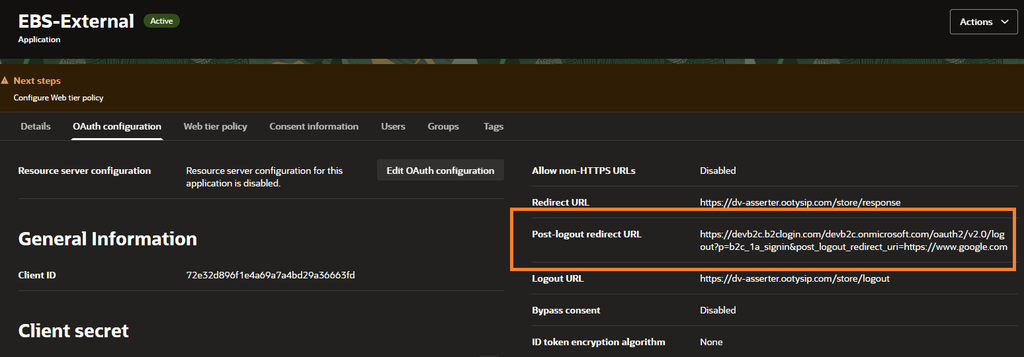
you can notice we configured https://devb2c.b2clogin.com/devb2c.onmicrosoft.com/oauth2/v2.0/logout?p=b2c_1a_signin&post_logout_redirect_uri=https://www.google.com for the Post-logout redirect URL in OCI App registration ideally it should be just https://www.google.com, since the custom social IDP in oracle OCI doesn’t have a logout capability we have to explicitly call the B2C logout endpoint to clear it’s session
Summary:
This article—the third part of a series on Oracle OCI IAM and Azure AD B2C integration—diagnoses and resolves broken Single Logout (SLO) flows across a hybrid stack of Oracle E-Business Suite (EBS), Oracle EBS Asserter, dual OCI IAM domains (Internal via Microsoft Entra ID and External via Azure AD B2C), and Azure AD B2C Custom Policies. It breaks down the four root causes behind stalled logouts and lingering sessions—misconfigured OCI IAM logout fields, Social IdP schema SLO limitations, B2C unhinted logout requirements, and single-Asserter routing lock-in—before walking through two complete fixes that keep shared B2C XML policies untouched: a chained post-logout redirect workaround for single-node environments and a standard Enterprise OIDC architecture using dual WebLogic Managed Servers on one host. The post concludes with a side-by-side comparison of both approaches and a Browser DevTools checklist to verify that every session cookie across all four tiers is cleanly invalidated.


Leave a Reply