Introduction:
Before diving into application session management in Azure AD B2C, let’s consider a real-world scenario.
You have a .NET web application integrated with Azure AD B2C for authentication, and your security requirement is straightforward:
The user session must automatically expire after 60 minutes, requiring the user to sign in again.
At first glance, this may look like a simple configuration change. However, in practice, session management in a federated authentication system like Azure AD B2C is controlled at multiple layers:
- Azure AD B2C token lifetimes (ID, access, refresh tokens)
- Azure AD B2C session behavior (SSO and policy-level session control)
- Application-level session cookie (ASP.NET / .NET authentication cookie)
If even one of these layers is not aligned, the user may remain signed in longer than expected due to silent token renewal or persistent application cookies.
So, to enforce a strict 60-minute session timeout, we must configure both Azure AD B2C and the application session cookie consistently.
Token Lifetime:
1. Access & ID token lifetimes (minutes)
Access and ID tokens are short-lived tokens issued after successful authentication, typically valid for a configurable number of minutes. These tokens are used by applications to authorize user access and should have shorter lifetimes to reduce security risks.
2. Refresh token lifetime (days)
Refresh tokens are long-lived credentials that allow applications to obtain new access and ID tokens without requiring the user to sign in again. Their lifetime is defined in days, enabling persistent sessions across longer periods.
3. Refresh token sliding window lifetime
This setting determines how long a refresh token remains valid as long as it is used. Each time the refresh token is used within the allowed window, its validity is extended, providing a seamless user experience.
4. Lifetime length (days)
This defines the absolute maximum duration a refresh token can live, regardless of sliding window activity. Once this limit is reached, the user must reauthenticate to obtain new tokens.
Session Behavior
1. Web app Session Lifetime
This setting controls how long the application session remains active after a user signs in. It governs the duration of the session cookie before requiring reauthentication.
2. Web app session timeout
Session timeout determines how long a session can remain idle before it expires. If the user is inactive beyond this period, they are prompted to sign in again, enhancing security by limiting unattended access.
Token Lifetime Configuration in Custom Policy
In Azure AD B2C custom policies, token lifetimes are defined in the JwtIssuer technical profile.
        <TechnicalProfile Id="JwtIssuer">
          <DisplayName>JWT token Issuer</DisplayName>
          <Protocol Name="OpenIdConnect" />
          <OutputTokenFormat>JWT</OutputTokenFormat>
          <Metadata>
            <Item Key="token_lifetime_secs">86400</Item>
            <Item Key="id_token_lifetime_secs">3600</Item>
            <Item Key="refresh_token_lifetime_secs">86400</Item>
            <Item Key="rolling_refresh_token_lifetime_secs">86400</Item>
            <Item Key="AuthenticationContextReferenceClaimPattern">None</Item>
          </Metadata>
          <UseTechnicalProfileForSessionManagement ReferenceId="SM-jwt-issuer" />
        </TechnicalProfile>
        <!-- Session management technical profile for OIDC based tokens -->
        <TechnicalProfile Id="SM-jwt-issuer">
          <DisplayName>Session Management Provider</DisplayName>
          <Protocol Name="Proprietary" Handler="Web.TPEngine.SSO.OAuthSSOSessionProvider, Web.TPEngine, Version=1.0.0.0, Culture=neutral, PublicKeyToken=null" />
</TechnicalProfile>- Access Token Lifetime (token_lifetime_secs)
Set to 86400 seconds (24 hours), allowing API access for an extended duration. - ID Token Lifetime (id_token_lifetime_secs)
Set to 3600 seconds (60 minutes) to align with the desired session duration. - Refresh Token Lifetime (refresh_token_lifetime_secs)
Set to 86400 seconds (24 hours), enabling silent token renewal without user interaction. - Sliding Refresh Token Lifetime (rolling_refresh_token_lifetime_secs)
Also set to 24 hours, allowing the refresh token to remain valid during active usage. - Session Management Reference
The SM-jwt-issuer technical profile enables Azure AD B2C’s built-in SSO session handling.
Enforcing 60-Minute Session Timeout:
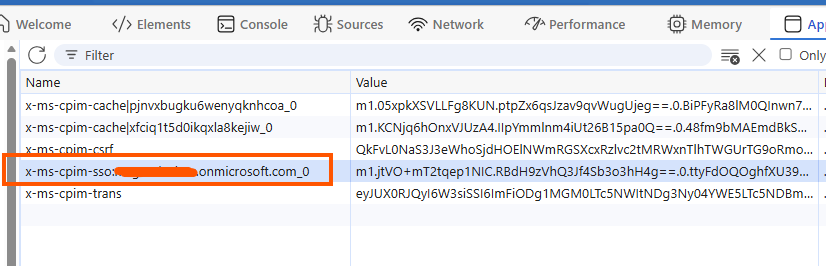
To enforce a strict 60-minute session timeout, token configuration alone is not sufficient. Azure AD B2C provides session control at the relying party level using UserJourneyBehaviors.
<UserJourneyBehaviors>
      <SingleSignOn Scope="TrustFramework" EnforceIdTokenHintOnLogout="true" />
      <SessionExpiryType>Absolute</SessionExpiryType>
      <SessionExpiryInSeconds>3600</SessionExpiryInSeconds>
</UserJourneyBehaviors>- SingleSignOn Scope=”TrustFramework”
Enables SSO across policies within the same trust framework. - SessionExpiryType = Absolute
Ensures the session expires after a fixed duration, regardless of user activity. This is critical for enforcing strict security requirements. - SessionExpiryInSeconds = 3600
Sets the session timeout to 60 minutes.
Application-Level Session Control (.NET)
In addition to Azure AD B2C configuration, the application itself must enforce the same session lifetime using cookie authentication settings.
configureCookieAuthenticationOptions: options =>
{
    options.Cookie.SameSite = Microsoft.AspNetCore.Http.SameSiteMode.None;
    options.Cookie.SecurePolicy = Microsoft.AspNetCore.Http.CookieSecurePolicy.Always;
    options.ExpireTimeSpan = TimeSpan.FromMinutes(60);
}
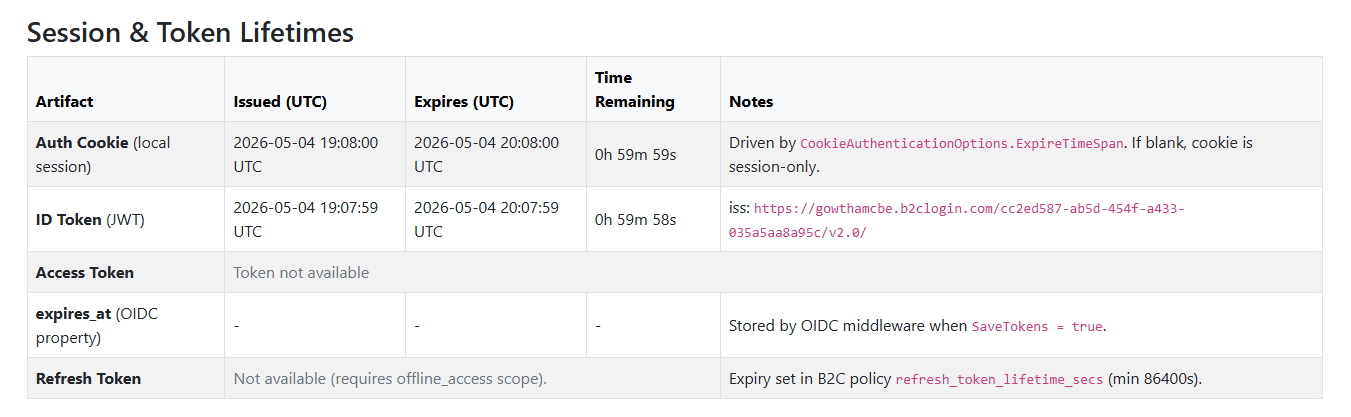
I created an MVC application integrated with Azure AD B2C to monitor the ID Token and local auth cookie session lifetimes, which might help test your change after updating the custom policies’ session configurations.
Summary:
Achieving a strict session timeout in Azure AD B2C requires aligning multiple configurations:
- Token lifetimes (ID, access, refresh tokens)
- Session management settings in custom policies
- Application session handling
By combining absolute session expiry with appropriate token settings, you can enforce secure and predictable user session behavior in your application.


Leave a Reply