Introduction:
Modern cloud architecture should minimize secret management while preserving strong authorization boundaries. In this implementation, we evolved Entra-ID-FunctionApp and EntraID-FunctionApp-Client from a delegated-token mindset toward a managed identity + app role model for service-to-service access.
The result is a secretless pattern: the client signs in users for UI access but calls the Function API with an app-only token obtained through managed identity. This article explains the architectural reasoning, the scope-vs-app-role decision, and production guidance for teams that still require delegated flows.
Scope vs App Role: Clear Difference
| Dimension | Scope (Delegated Permission) | App Role / Application Permission |
| Identity context | User + app | App/workload only |
| Typical OAuth claim | scp | roles |
| Flow type | Delegated (auth code, OBO, etc.) | Client credentials / Managed Identity |
| Requires signed-in user | Yes | No |
| Assignable to managed identity | No | Yes |
| Best for | User-driven API access | Service-to-service/API daemon access |
Why App Role Is Not a Delegated Permission
An app role in this architecture is an application permission.
It represents what a calling application (or managed identity service principal) can do as itself, not on behalf of a user.
So when your client app uses managed identity to call the Function API:
- token is app-only,
- authorization is evaluated via roles,
- no user delegation exists in that API token.
That is exactly why this model is secure and secretless for backend calls.
Why Managed Identity Removes the Need for Client Secret
With managed identity in Azure:
- Azure hosts identity credentials for the workload.
- DefaultAzureCredential fetches tokens from the platform identity endpoint.
- No client secret is stored in config, code, or Key Vault for this caller path.
- Rotation and credential lifecycle are handled by the platform.
This directly reduces secret leakage risk and operational burden.
Recommendation for Delegated Scenarios (When Scope Is Required)
If your use case truly needs delegated user permissions (scp) for the Function API:
- Use a delegated OAuth flow (typically authorization code + PKCE).
- For production confidential clients, prefer client certificate authentication over client secrets.
- Keep delegated and app-only paths explicit in design and authorization logic.
Recommendation:
- Use scope for user-delegated access patterns.
- Use app role + managed identity for service-to-service patterns.
Why Scope Cannot Be Assigned to Managed Identity (and the MS Graph Confusion)
Managed identity is a service principal without user context.
Delegated scopes require user context, so they cannot be directly assigned to MI.
Why this seems different in Microsoft Graph:
- In Graph, many permissions seen in enterprise apps are application permissions (app roles), even if names resemble scope-like labels.
- What MI receives for Graph is still app-only permissioning behavior.
- /.default means: “issue token with already-consented app permissions for that resource,” not “assign a delegated scope to MI.”
So the rule is consistent:
MI can be granted app permissions/app roles, not delegated scopes.
Production Architecture Guidance
For enterprise-grade rollout:
- Keep Function API authorization strict on roles for app-only endpoints.
- Use separate endpoints/policies if both delegated and app-only access are needed.
- Use least-privilege app roles (user.access or narrower role taxonomy).
- Log token claims and authorization failures for auditability.
- Use certificate-based confidential client auth only for delegated production scenarios where MI cannot be used.
Let me walk you through the application that I created to experiment
I created a function app API with below functionalities
- Entra-ID-FunctionApp is an Azure Functions API that exposes a protected
GET /api/auth/pingendpoint in AuthenticatedFunction.cs. - It validates Microsoft Entra access tokens using tenant OpenID metadata, issuer/audience checks, signature keys, and token lifetime rules.
- Access is authorization-gated by a required app role (
user.accessby default), so only callers with the correct role can get a success response.
The Client app created to consume the API
- EntraID-FunctionApp-Client is a Blazor Server web app that demonstrates secure client access to an Azure Function API.
- It uses Microsoft Entra ID (OpenID Connect) for user sign-in and protects the Function ping page with authorization.
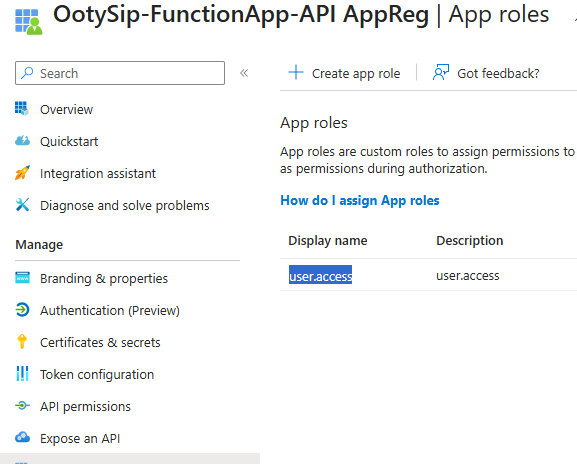
- MS Entra ID Application is registered, exposed the API, and created an app role (user.access)
- For outbound API calls, it acquires tokens via DefaultAzureCredential (managed identity in Azure App Service).
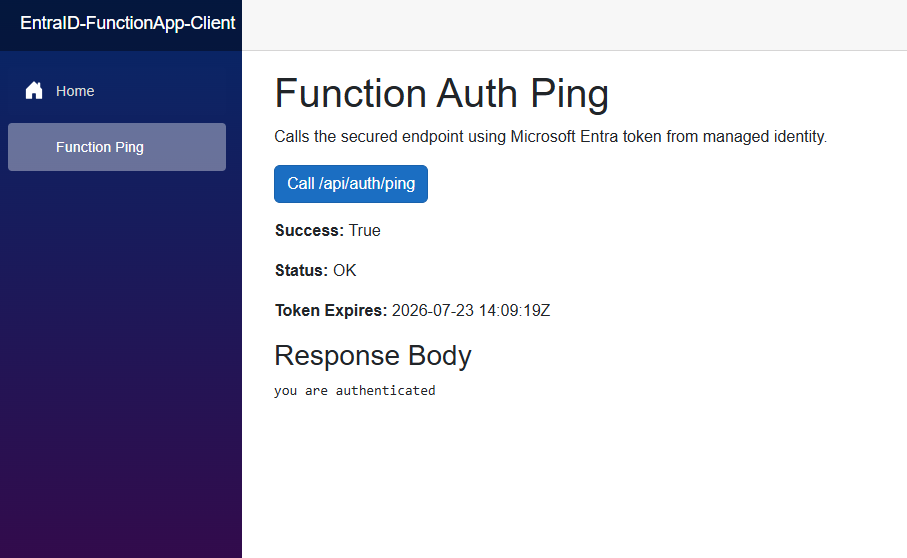
- The app calls a protected
/api/auth/pingendpoint and shows status, token expiry, response body, and errors in the UI. - Configuration is appsettings-driven (
FunctionApi:BaseUrl,FunctionApi:PingPath) to support local run and cloud deployment.
Used the PowerShell script below to assign the app role to the system-assigned managed identity for the web app
az rest -m POST -u https://graph.microsoft.com/v1.0/servicePrincipals/{managed identity object id}/appRoleAssignments -b '{"principalId": "{managed identity object id}", "resourceId": "{MS Entra ID API app object ID}","appRoleId": "{API app role ID}"}'After the role is assigned, test the API call using the client app
Summary
The updated EntraID Function architecture correctly aligns identity model to workload type:
- User sign-in remains in the client for interactive UX.
- API invocation is now secretless through managed identity.
- Authorization is enforced using app roles, not delegated scopes.
- This is the right pattern for service-to-service Function API calls in Azure.
Use scopes when you need user delegation.
Use app roles with managed identity when you need secure, scalable, operationally clean backend access.


Leave a Reply