Introduction:
In a .NET 8 server-side MVC application integrated with Microsoft Entra ID, a common requirement is to force the user session to time out after 60 minutes. At first glance, this looks simple: configure the local application cookie to expire after 1 hour, and the problem appears to be solved. In practice, it is not that simple. A signed-in Entra ID application typically involves multiple layers of session state, each of which behaves differently.
There are three pieces to understand clearly. First, there is the Microsoft Entra ID browser session, which is maintained by cookies set by the Microsoft identity platform in the user’s browser. Second, there is the local application session, usually represented by the ASP.NET Core authentication cookie issued by the MVC app after a successful sign-in. Third, there is the ID token, which Entra ID returns during authentication, and the application uses to establish the signed-in user’s identity. If the goal is a true 60-minute timeout that can require the user to prove identity again, all three need to be considered together.
Understanding the Entra ID Browser Session, App Cookie, and ID Token
When a user signs in to a .NET 8 MVC app using OpenID Connect and Entra ID, the browser is redirected to the Microsoft identity platform. After successful authentication, Entra ID issues tokens, and the application typically creates its own local authentication cookie. From that point on, the user appears signed in to the application because the app trusts its own cookie on subsequent requests.
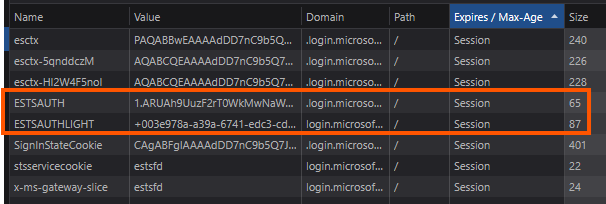
The Entra ID browser session is separate from the local app session. Entra ID stores its own session cookie in the browser, so that if the app redirects the user back to Entra ID later, Entra ID can recognize that the user already has an active Microsoft sign-in session. When that happens, the user may be sent back to the app without having to re-enter a password. The Entra ID browser session is shown in the figure below.
The local application cookies are different. This is the cookie your ASP.NET Core app issues after sign-in. It controls how long the app itself considers the user authenticated. If this cookie expires, the app can challenge the user again. But that challenge does not necessarily mean the user must enter credentials again.
The ID token is also a separate concern. It is a token issued by Entra ID that contains identity claims about the user. The application uses it during sign-in to establish the user’s identity and then usually relies on the local cookie for ongoing session continuity. In most server-side MVC applications, the app is not revalidating the ID token on every request. The cookie becomes the primary local session mechanism after logging in.
Why ExpireTimeSpan Alone Does Not Fully Enforce a Real Session Timeout?
A common mistake is to configure only the ASP.NET Core cookie expiration and assume that this guarantees a complete logout experience after the timeout.
For example, setting the local app cookie to expire after 60 minutes certainly ends the application’s local session. But it does not end the Entra ID browser session.
That distinction matters. Once the local app cookie expires, the next request to a protected page causes the app to challenge the user through OpenID Connect. The browser is redirected back to Entra ID. If the Entra ID browser session is still active, Entra ID may silently authenticate the user and return a new ID token to the application. The app then issues a new local cookie, and the user is back in the app without having to enter a password.
This means that configuring only the local cookie timeout solves only one part of the problem: it expires the application’s own session state. It does not guarantee a true reauthentication event. From the user’s perspective, the app may appear to “time out,” but then immediately sign them back in because Entra ID still has an active browser session.
So, if your requirement is merely “expire the local app session after 60 minutes,” ExpireTimeSpan is enough. But if the requirement is “after 60 minutes, the user must authenticate again and not just slide back in through SSO,” then ExpireTimeSpan alone is insufficient.
Why This Happens: SSO Is Still Doing Its Job
This behavior is not a bug. Single sign-on is working as designed.
Microsoft Entra ID is intended to reduce the number of sign-in prompts across applications. If the identity provider still trusts the user’s browser session, it can issue a new authorization response without asking for credentials again. Your app’s local cookie may be gone, but the user’s upstream identity session may still be valid.
That is why local app timeout and identity-provider reauthentication are two different controls. One belongs to your application. The other belongs to the identity platform.
Where max_age Fits In
If the goal is to ensure the user has recently authenticated, max_age is the key OpenID Connect parameter to use. It tells the identity provider the maximum acceptable age of the user’s authentication session. In other words, it says: only accept this authentication if the user was last actively authenticated within the specified number of seconds.
If the authentication is older than that threshold, Entra ID should require the user to reauthenticate before issuing a fresh response. This mechanism addresses the gap left by local cookie expiration alone.
For a 60-minute requirement, the value should be 3600 seconds:
context.ProtocolMessage.SetParameter("max_age", "3600");In practical terms, this means that when the app sends the user to Entra ID for sign-in, Entra ID checks the auth_time of the user’s session. If the last real authentication happened more than 60 minutes ago, Entra ID should not silently reuse the session without fresh authentication.
An Important Precision About max_age and ID Tokens
It is worth being precise here: max_age does not directly set the ID token lifetime. That is a subtle but important distinction.
What max_age controls is the maximum age of the user’s authentication at the identity provider. If that age is exceeded, Entra ID should force reauthentication before issuing a new authentication result, including a new ID token. So, while max_age influences whether a newly issued ID token can be obtained silently, it is not the same thing as configuring the token’s expiration lifetime.
A better way to say it is this: max_age controls authentication freshness, and that freshness check determines whether Entra ID can issue a new ID token without prompting the user again.
That is the real reason max_age is useful in this scenario. It is not just about token duration. It is about whether the user must reprove their identity.
How This Applies to a .NET 8 Entra ID MVC App
In a .NET 8 MVC application using Microsoft.Identity.Web, the usual setup includes OpenID Connect for sign-in and cookies for maintaining the local authenticated session. If you configure only cookie settings like this:
options.ExpireTimeSpan = TimeSpan.FromMinutes(60);
options.SlidingExpiration = false;
options.Cookie.MaxAge = options.ExpireTimeSpan;
You are defining the duration of the local app session. That is still necessary. It ensures the app does not keep the user authenticated forever.
But to make the 60-minute limit meaningful from a security perspective, you also need the OpenID Connect request to include max_age=3600. That tells Entra ID not to rely on an older authentication event indefinitely.
With both controls in place, the flow becomes much closer to the intended behavior:
- The local app cookie expires after 60 minutes.
- The next request triggers an authentication challenge.
- The app redirects the user to Entra ID.
- Entra ID checks whether the user is authenticated within the last 60 minutes.
- If not, Entra ID requires fresh authentication before issuing a new sign-in response.
That combination is what gives you a more complete session-timeout story.
Why This Still Matters in Server-Side Apps
This topic is especially important in server-side applications because developers often assume the server owns the session in its entirety. In reality, once OpenID Connect with Entra ID is involved, session behavior is shared between the application and the identity provider.
- The application controls its cookie lifetime.
- Entra ID controls the upstream identity session.
- The browser stores both sets of cookies.
- The ID token is part of the authentication exchange, not the entire session strategy.
Ignoring any one of these layers leads to confusing behavior, especially when users appear to be logged out and then instantly logged back in.
Summary:
In a .NET 8 server-side MVC application integrated with Microsoft Entra ID, a 60-minute session timeout cannot be enforced correctly when configured only for the local application cookie. The local cookie controls how long the app trusts its own session, but it does not invalidate the Microsoft Entra ID browser session. As a result, when the local cookie expires, the user can often be signed back in silently through Entra ID without entering a password again.
To build a true 60-minute timeout experience, you need to understand the separation between the Entra ID browser session cookies, the local app authentication cookie, and the ID token used during sign-in. The missing piece is max_age, which tells Entra ID how fresh the user’s authentication must be. Strictly speaking, max_age does not directly define the ID token lifetime. Instead, it defines the maximum allowable age of the user’s last authentication and forces reauthentication when that threshold is exceeded.
That is why the right design is not “cookie timeout only,” but “local cookie expiration plus authentication freshness enforcement.” In an Entra ID-integrated .NET 8 MVC app, that is what turns a nominal timeout into real security control.


Leave a Reply